Agent skills for Claude Code, Cursor, Codex, Copilot and Gemini CLI
No defaults.
Two skills that make your AI coding agent decide every element of a website, instead of shipping the one it always ships.
It researches how the work is really done, writes a concept, and builds the page from the subject's own objects. Then it picks the lightest motion that carries it: native CSS scroll animations first, GSAP, Lenis and Three.js only where the concept needs them.
What your agent ships by default. Scroll to peel it off.
What gets cut
Each of these is a library default. The skills make the agent notice it, name the version that belongs to your subject, and build that instead.
DefaultDecided
Centered hero with a primary and a ghost buttonInsteadAn opening that shows the subject itself
Three icon cards in a rowInsteadA layout taken from the subject's own spatial metaphor
Indigo-to-purple gradient on whiteInsteadFour to six colors taken from the subject's world
System font at one size and one weightInsteadA real type pairing with a set scale
A spinner, "No data" and a red "Error" toastInsteadLoading, empty and error states that tell people what to do next
Everything fades in, or nothing moves at allInsteadWeighted motion only on the gestures that matter
"Manage your workflow efficiently"InsteadCopy that names what the user actually controls
Concept before code
studio-sites stops the agent from writing code until it has researched how the subject's work is really done and written five lines: the tension, the truth about the subject, one idea, one signature effect and one thing it won't do. This is the statement behind the page you're reading.
Concept statementNo Defaults · this page
Big Question
How can we prove a design method works without the page turning into an effects reel, while still making a $19 decision take ten seconds?
Subject Truth
Generated sites look generated because nobody decided anything. Every element was left at its default.
Concept
The page is a cutting mat. The default template is a sticker on it, and the kit peels it off.
Signature
One WebGL peel on the sticker, because the product removes defaults.
Restraint
Everything after the hero is flat paper and type. No second effect, no parallax, no preloader.
The peel uses the image-plane recipe in references/threejs-signature.md, with a curl added to the vertex shader.
Built from one line
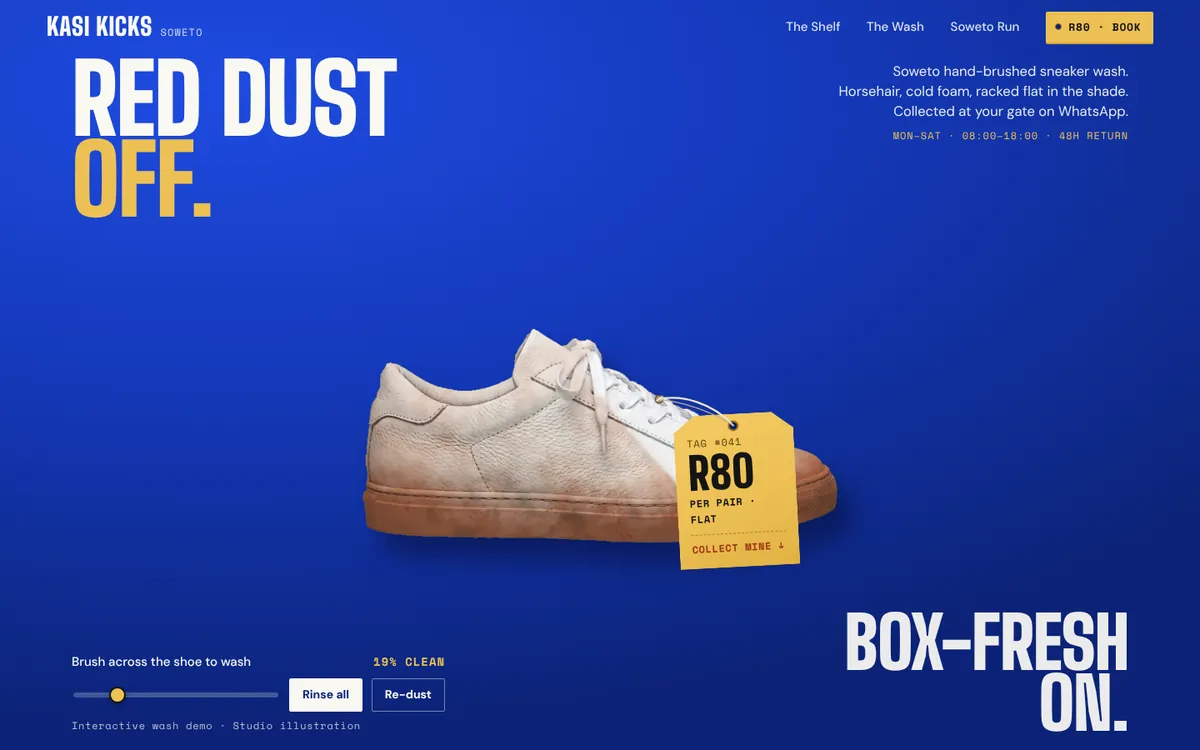
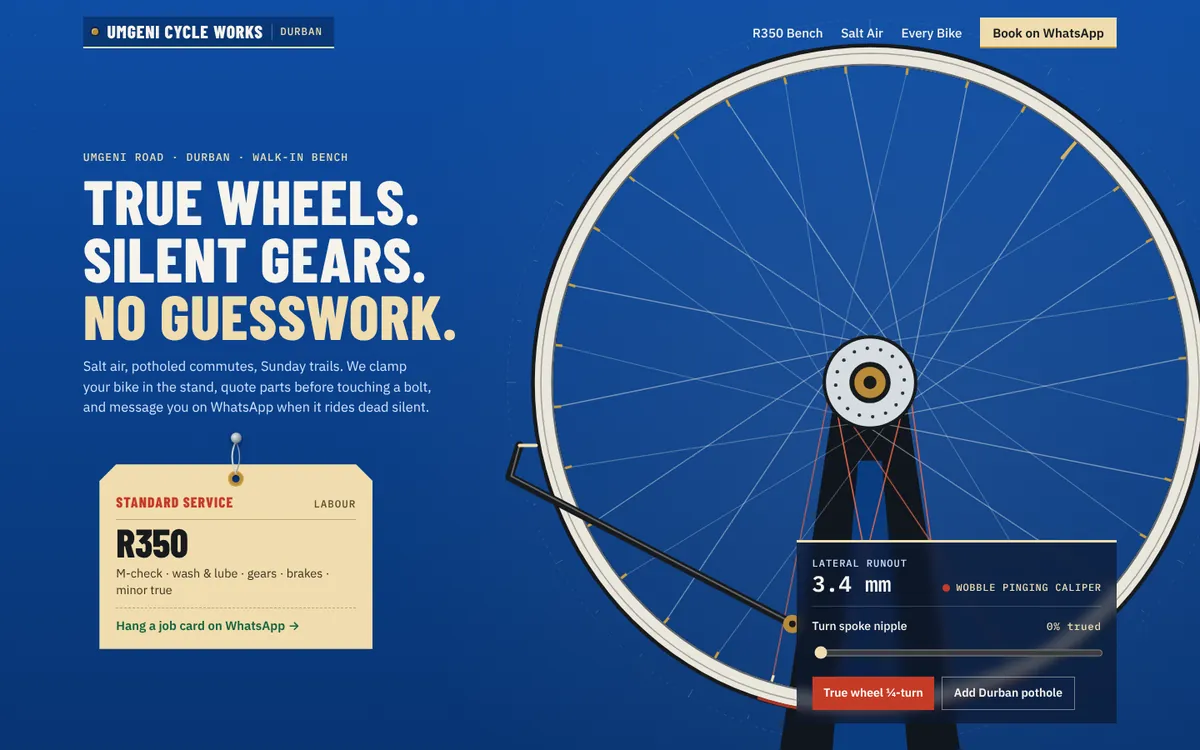
Two sites an AI agent (Google Antigravity) built with the kit installed. Each started from a one-line prompt. Both businesses are made up; the images were generated by the agent.
Umgeni Cycle WorksBicycle workshop · Durban
PromptBuild a one-page site for Umgeni Cycle Works, a bicycle repair workshop in Durban: a standard service is R350, bookings on WhatsApp.
No design feedback during the build. The agent found out that sea air rusts chains and seizes bolts, so the site leads with coastal prep, never pressure-washes, and promises no parts fitted without a WhatsApp photo first. You can true the wheel with a spoke key, then fill in a handlebar job card that becomes the WhatsApp message.
PromptBuild a one-page site for Kasi Kicks, a sneaker-cleaning service in Soweto: R80 a pair, collection on WhatsApp.
One round of feedback: "research how shops really dry sneakers." The agent swapped hanging hooks for a ventilated drying shelf, and that research step is now built into the kit. Scrub the shoe clean with your cursor, put pairs on the slip from the shelf, and tear off the stub to open WhatsApp.
Two skill folders your agent loads on its own when you ask for a site or an interface. They work together: studio-sites owns the concept and the motion, craft-led-interfaces owns the details.
studio-sites
Field research, concept phase, design language, motion architecture and build order for landing pages, portfolios, product and campaign sites.
SKILL.mdThe method, the build order and a pre-ship smell test
references/native-motion.mdNative CSS scroll-driven animations, sticky scrubbed scenes, Canvas 2D and raw WebGL2 shaders, with no library at all
references/lenis-gsap.mdLenis and ScrollTrigger on one clock, SplitText line reveals, clip-path wipes, preloader, fallback scroller
references/threejs-signature.mdWebGL planes locked to DOM images, peel, curl, wave and hover shaders, color handling, performance limits
references/assets.mdBuilding the page from the subject's real objects: interface parts as objects, images that look like one shoot, joins that don't float, honesty rules
references/concept-worksheet.mdField notes and the five-line concept statement, with worked examples
craft-led-interfaces
The detail layer for any interface, from a landing page to a settings screen. It covers refusing each default, designing the in-between states, spending motion where it helps, and a 15-point check before shipping.
SKILL.mdFramework-agnostic. Works as a skill or pasted in as a project rule.
Also free on GitHub, so you can try the method before you buy.
Also included: an install guide for six agents, including the Claude app. The source of this page is open on GitHub as a worked example.
Claude Code · Claude app · Cursor · OpenAI Codex · GitHub Copilot · Gemini CLI · any agent that reads SKILL.md
One line to install
Unzip, then copy both folders into your agent's skills folder. This is the command for Claude Code. The README has the paths for the other five.
It's two skill folders that load on their own when you ask for a site or an interface, plus reference files the agent reads before it writes scroll or WebGL code. The recipes are pinned to current library versions, so the agent stops guessing at APIs that have changed.
Which agents does it work with?
Anything that reads SKILL.md: Claude Code, the Claude app, Cursor, OpenAI Codex, GitHub Copilot and Gemini CLI. For other tools, paste a skill into a project rule.
What does my agent need?
Web search, so it can research how the business really works, and an image tool for the objects on the page. Without an image tool it leaves sized placeholders and writes the image prompts for you. It finishes with a list of things to replace before going live, like phone numbers and stand-in photos.
Can I use it for client work?
Yes, on as many of your own and your clients' projects as you like. The one thing you can't do is republish the skill files.